Start with your voice.
Import a video and generate captions on your CPU with the included multilingual model. No transcription credits. No footage sent to a cloud service.
Model included. No first-run model download.OFFLINE AI CAPTION SOFTWARE FOR WINDOWS
LocalCaptions creates AI captions offline on your Windows PC. Transcribe video, customize 12 caption styles, and export MP4, SRT or ASS—without uploading your footage.
One-time purchase · No subscription · Personal & commercial use
FROM FIRST WORD TO FINAL FRAME
Spend your time shaping the story. Keep the tools—and your media—close at hand.
Import a video and generate captions on your CPU with the included multilingual model. No transcription credits. No footage sent to a cloud service.
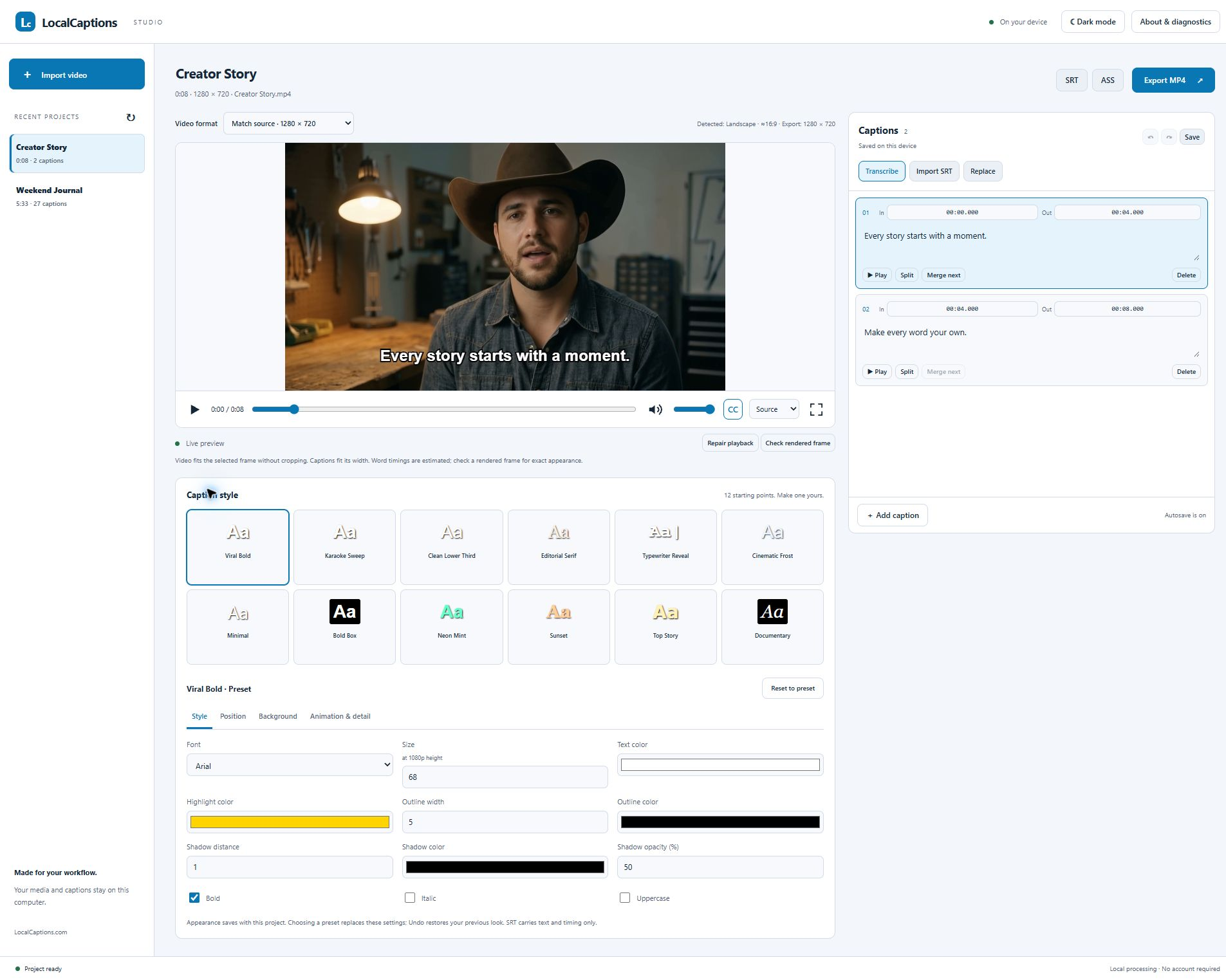
Model included. No first-run model download.Edit text and timing, split and merge captions, or bring your own SRT. Autosave and session undo/redo help you keep moving.
Always review automated captions before publishing.Choose a preset, then adjust font, size, colors, outline, shadow, placement, background and animation. Your look saves with your project.
From quiet subtitles to bold creator captions.TWELVE STARTING POINTS. YOUR FINISHING TOUCH.
Give a short more energy. Give an interview room to breathe. Start with a look, then make it your own.
Select a style to explore an illustrative sample. Exact rendering and animation are available in the desktop app.
Make every word
worth watching.
Your story.
A wider view.
Small screen.
Big story.
SHORTS, REELS & LONG-FORM
Match your source video or choose portrait 9:16 and landscape 16:9. The preview follows your format, so you can shape captions for the space.
LOCAL IS THE WHOLE POINT
Your imported footage, generated captions and exports stay in local project storage. The desktop app has no telemetry, no advertising and no mandatory account. Its familiar browser interface runs on your own computer.
See how your information is handled →BUY ONCE. GET TO WORK.
For your channel, your business, your clients, and whatever you create next.
For Windows desktop and laptop PCs. Technical support, future updates and permanent download access are not included or guaranteed. Keep a secure copy of your installer.
Check system requirements →One-time payment. No subscription.
Digital delivery · Secure payment through Stripe
Available worldwide where checkout is supported.
Any applicable taxes are shown at checkout.
All sales final; no discretionary refunds. Mandatory consumer rights remain unaffected. Refund policy · License terms
A FEW GOOD QUESTIONS
No. $29.99 is a one-time purchase of a license to the supplied software. There are no per-minute captioning charges. Future releases, support and indefinite download access are not included or guaranteed.
The desktop app processes imported media, transcription and exports locally. It does not upload your footage or send usage telemetry. Website purchases and Stripe payments are separate from the app’s local processing.
LocalCaptions is Windows desktop software for x64 desktop and laptop PCs. The release was tested on Windows 11. It is not a mobile app and is not supported on macOS, Linux, ARM-native systems or tablets. See the system requirements before buying.
Yes. Personal and commercial use are included. You can install it on unlimited compatible computers you own or control. The license belongs to the purchaser; it does not allow sharing or reselling the software to other people.
Yes. Choose 9:16 for portrait video, 16:9 for landscape, or match your source. The video fits the chosen canvas without cropping or stretching; padding may appear when proportions differ.
Export a video with captions burned into an MP4, a styled ASS subtitle file, or an SRT containing caption text and timing. SRT does not carry visual styling.
Automatic transcription can mishear words and produce timing errors. Review and correct your captions before publishing. Processing time depends on your CPU, the media and its duration.
After successful payment, use your order and customer account to access the purchased download. Download promptly and keep a secure backup. All sales are final except where applicable law requires a refund or other remedy. See the refund policy for details.
YOUR NEXT VIDEO IS WAITING
Your voice. Your look. Your LocalCaptions.